Part 3: Normal mapping
Part2에서 만든 이미지입니다.
바닥평면과 구 물체에는 표면에 텍스쳐 맵을 추가해 디테일을 넣었음에도 굉장히 flat 해보입니다.

Part3에서는 normal mapping을 구현하여 표면이 디테일을 가진 것 처럼 보이도록 할 것입니다.
normal mapping의 아이디어는 'normal map'이라는 텍스쳐맵에 벡터 값을 저장해놓고 해당 벡터값을 표면의 normal vector로 사용하는 것입니다. Normal Vector를 표면의 점마다 정의한다면, 빛의 반사를 풍부하게 표면해 표면 질감이 더 도드라집니다.
우측 그림이 normal map의 예시입니다.
![[fig1] 출처 : https://github.com/stanford-cs248/shading](https://blog.kakaocdn.net/dna/emX38C/btrVmYtg52e/AAAAAAAAAAAAAAAAAAAAAHtW8ccMi7r4aLZatVNiFD6PT1X5g2dyHQxyJPNJPyBs/img.png?credential=yqXZFxpELC7KVnFOS48ylbz2pIh7yKj8&expires=1774969199&allow_ip=&allow_referer=&signature=3LN3WB7EQU%2BFhuKaY0pv0WuYs%2BQ%3D)
normal map의 RGB 값은 각각 (x,y,z) 벡터를 나타내고 이 벡터는 물체의 표면에서의 normal vector 방향을 의미합니다. 하지만 이 vector는 object space나 world space에서 정의된 vector가 아니라 표면의 tangent space에서 표현됩니다.
표면의 tangent space란, 각각의 표면점 마다 정의되는 space인데 각 점에서 normal vector를 Z축(그림에서 파랑)으로 기준삼고, 표면을 향하는 Tangent vector를 X축(그림에서 빨강)으로 정의하는 공간입니다.
이 Tangent vector는 모델 파일을 로드할 때 정의되어 있다면 vertex position, uv와 같이 불러올 수 있습니다.
normal mapping은 물체 표면의 점을 받아서, 이 점에 있는 적절한 위치의 vector (tangent space)를 normal map으로부터 가져옵니다. 이 tangent space vector를 world space vector로 변환하여 기존의 Reflection Model에서 사용되던 normal vector ($\hat{N}$)로 대체됩니다.
수정할 파일은
- src/shader/shader.vert
- src/shader/shader.frag
- src/dynamic_scene/mesh.cpp:Mesh::internalDraw()
입니다.
shader.vert 파일입니다.
여기서는 tan2world , 즉 tangent space vector를 world space로 옮겨야합니다.
uniform mat4 obj2world;                 // object to world transform
uniform mat3 obj2worldNorm;             // object to world transform for normals
uniform vec3 camera_position;           // world space camera position

uniform mat4 mvp;                       // model-view-projection matrix

uniform bool useNormalMapping;         // true if normal mapping should be used

// per vertex input attributes
in vec3 vtx_position;            // object space position
in vec3 vtx_tangent;
in vec3 vtx_normal;              // object space normal
in vec2 vtx_texcoord;
in vec3 vtx_diffuse_color;

// per vertex outputs
out vec3 position;                  // world space position
out vec3 vertex_diffuse_color;
out vec2 texcoord;
out vec3 dir2camera;                // world space vector from surface point to camera
out vec3 normal;
out mat3 tan2world;                 // tangent space rotation matrix multiplied by obj2WorldNorm

void main(void)
{
    position = vec3(obj2world * vec4(vtx_position, 1));

    // TODO CS248 Part3: Normal Mapping
    // compute 3x3 tangent space to world space matrix here: tan2world


    // Tips:
    //
    // (1) Make sure you normalize all columns of the matrix so that it is a rotation matrix.
    //
    // (2) You can initialize a 3x3 matrix using 3 vectors as shown below:
    // vec3 a, b, c;
    // mat3 mymatrix = mat3(a, b, c)
    // (3) obj2worldNorm is a 3x3 matrix transforming object space normals to world space normals
    // compute tangent space to world space matrix

    normal = obj2worldNorm * vtx_normal;

    vertex_diffuse_color = vtx_diffuse_color;
    texcoord = vtx_texcoord;
    dir2camera = camera_position - position;
    gl_Position = mvp * vec4(vtx_position, 1);
}
input attributes를 보시면, vtx_tangent 값이 input으로 들어온 것을 볼 수 있습니다.
이 값은 [fig1] 그림에서 T vector와 같습니다.
[fig1] 그림에서의 N vector는 object space의 normal인 vtx_normal을 obj2worldNorm 매트릭스를 사용하여 world space로 보냈으니 normal 변수와 같겠습니다.
그렇다면 B vector만 계산하면 tangent coordinate의 NTB axis를 완성할 수 있겠습니다.
B vector는 N, T를 외적하면 구할 수 있습니다. (오른손 법칙에 주의하세요.)
tan2world라는 output 값을 계산해줍니다. 이 tan2world 값은 vector shader의 output으로 내보내지면 Part2에서 사용되는 퐁 쉐이딩 fragment shader코드의 input으로 넘겨집니다.
$\begin{equation*}
tan2world =
\begin{pmatrix}
T_{x} & T_{y} & T_{z} \\
B_{x} & B_{y} & B_{z} \\
N_{x} & N_{y} & N_{z}
\end{pmatrix}
\end{equation*}$
src/shader/shader.vert 하단의 코드는 다음과 같습니다.
	...
    gl_Position = mvp * vec4(vtx_position, 1);

    if (useNormalMapping) {
        vec3 B = normalize(cross(normal, vtx_tangent));
        vec3 T = normalize(vtx_tangent);

        // mat3 constructor is column-major
        tan2world = mat3(T, B, noraml);
    }
다음은 src/dynamic_scene/mesh.cpp:Mesh::internalDraw() 함수를 수정해봅시다.
여기는 간단한데요, 기존에 diffuseTexture를 사용하는 코드에서는 "diffuseTextureSampler"라는 이름으로 실제 텍스트 이미지를 셰이더쪽으로 넘겨줍니다.
        if (doTextureMapping_)
        	shader_->setTextureSampler("diffuseTextureSampler", diffuseTextureId_);

        // TODO CS248 Part 3: Normal Mapping:
        // You want to pass the normal texture into the shader program.
        // See diffuseTextureSampler for an example of passing textures.
위의 diffuseTexture코드를 참고하여 normalTexture도 셰이더로 넘겨줍니다.
        if (doTextureMapping_)
        	shader_->setTextureSampler("diffuseTextureSampler", diffuseTextureId_);

        // TODO CS248 Part 3: Normal Mapping:
        // You want to pass the normal texture into the shader program.
        // See diffuseTextureSampler for an example of passing textures.

        if (doNormalMapping_)
            shader_->setTextureSampler("normalTextureSampler", normalTextureId_);
마지막으로 src/shader/shader.frag 코드를 수정해봅시다.
현재는 normal값으로 world normal값을 보내주고 있습니다.
if (useNormalMapping) {
       // TODO: CS248 Part 3: Normal Mapping:
       // use tan2World in the normal map to compute the
       // world space normal baaed on the normal map.

       // Note that values from the texture should be scaled by 2 and biased
       // by negative -1 to covert positive values from the texture fetch, which
       // lie in the range (0-1), to the range (-1,1).
       //
       // In other words:   tangent_space_normal = texture_value * 2.0 - 1.0;

       // replace this line with your implementation
       N = normalize(normal);

    } else {
       N = normalize(normal);
    }
useNormalMapping이 true인 경우, normal 값을 normalTexture로부터 가져와 tangent space => world space로 변환해주면 됩니다.
주의할 점은 texture 특성상 rgb값이 0~1 값으로 채워져있는데요, 먼저 이 값을 -1~1 사이의 값으로 변환해주어야합니다.
먼저 , mesh.cpp:Mesh::internalDraw() 에서 넘겨주었던 "normalTextureSampler"를 sampler2D 타입으로 선언해줍니다.
//
// texture maps (line 12)
//

uniform sampler2D diffuseTextureSampler;

// TODO CS248 Part 3: Normal Mapping

uniform sampler2D normalTextureSampler;
그리고 다시 line 147로 가서,
normalTextureSampler 을 가져와 -1~1 사이의 값으로 변환해주고
vertex shader에서 넘겨받은 tan2world 매트릭스를 사용, tangent space normal 벡터를 world 벡터로 변환해줍니다.
마지막으로 normalize해주면 완성입니다.
if (useNormalMapping) {
       // TODO: CS248 Part 3: Normal Mapping:
       // use tan2World in the normal map to compute the
       // world space normal baaed on the normal map.

       // Note that values from the texture should be scaled by 2 and biased
       // by negative -1 to covert positive values from the texture fetch, which
       // lie in the range (0-1), to the range (-1,1).
       //
       // In other words:   tangent_space_normal = texture_value * 2.0 - 1.0;

       // replace this line with your implementation

        vec3 normal_rgb = texture(normalTextureSampler, texcoord).rgb;
        vec3 tangent_space_normal = normal_rgb * 2.0 - 1.0;

        N = tan2world * tangent_space_normal;
        N = normalize(N);

    } else {
       N = normalize(normal);
    }
컴파일 하고 실행해봅시다.
$ make
$ ./render ../media/spheres/spheres.json
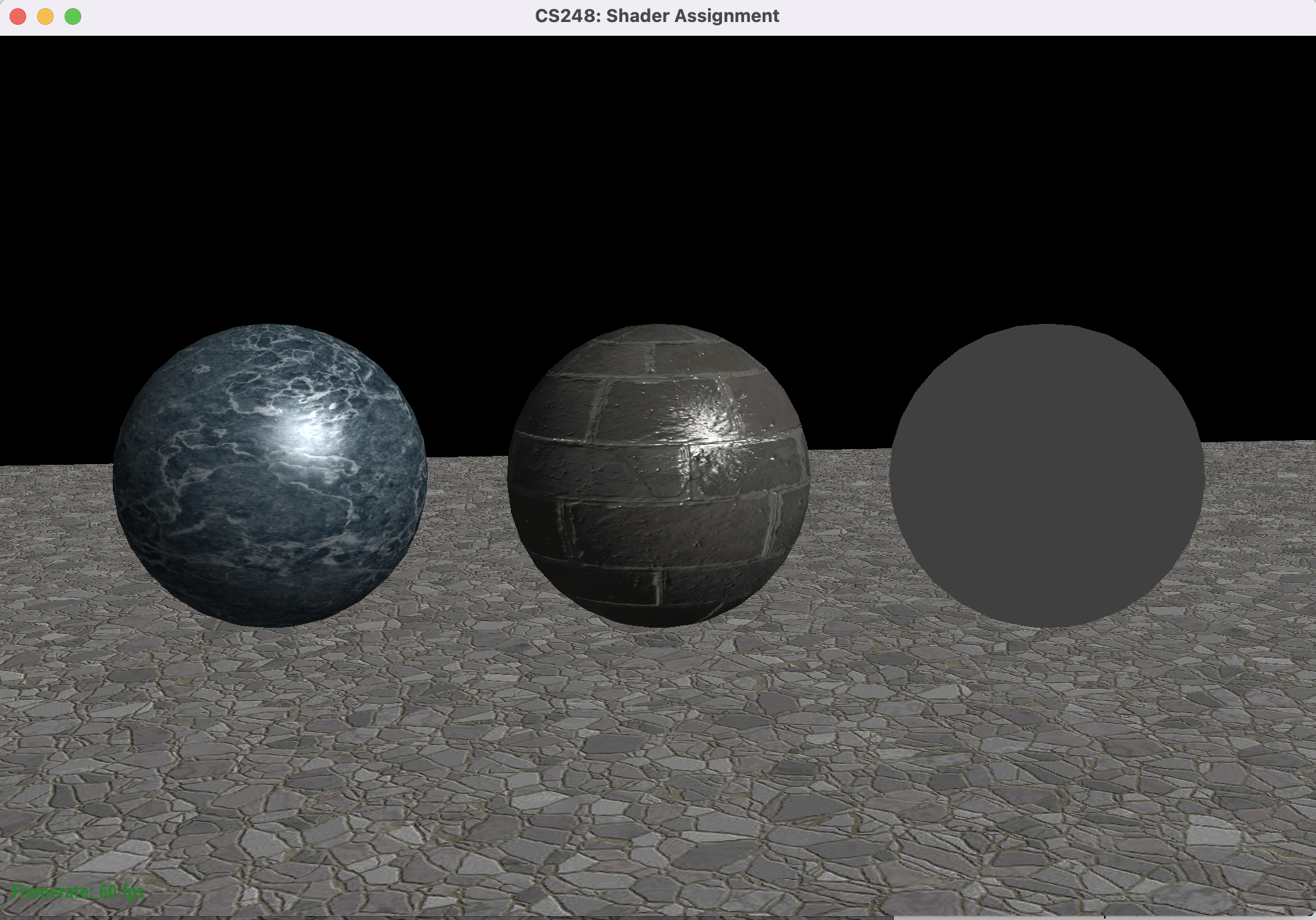
가운데 벽돌 sphere의 표면이 좀 더 까칠하게 표현되고, 벽돌의 사이 부분의 빛 반사 효과가 그럴듯하게 보입니다.

바닥의 표면 역시 normalMapping이 적용되자 입체감이 생겼습니다.
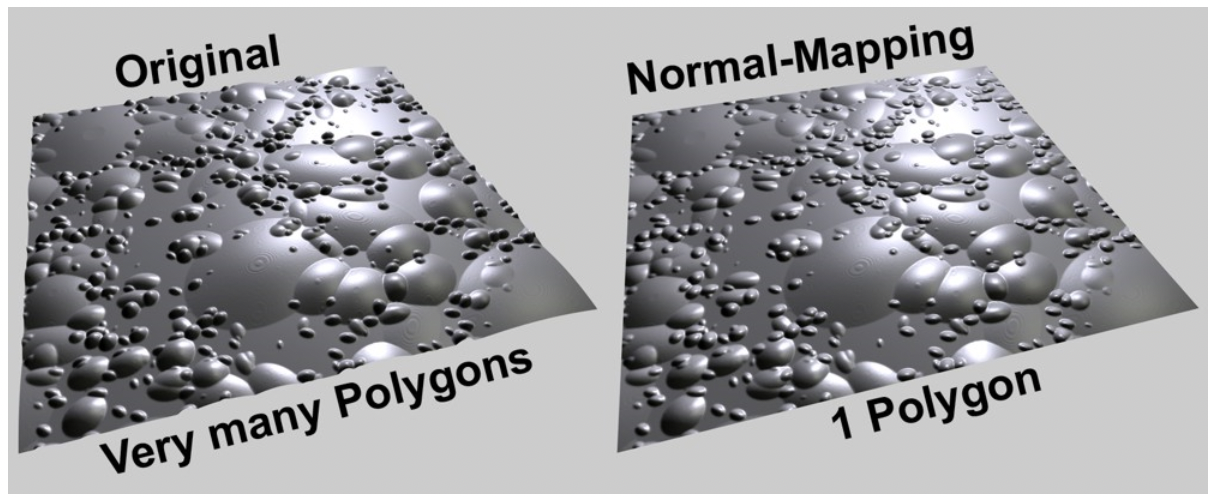
이처럼 Normal Mapping을 사용한다면, 물체의 표면의 normal vector를 임의로 조작해 Phong-반사모델을 통해 입체감을 형성할 수 있습니다. Computer Graphics 분야에서 Low-polygon 메시에 normal map을 추가해서 값싼 비용으로 디테일을 추가할 수 있기 때문에 실무에서도 아주 유용하게 사용되고 있는 기술입니다.
하단의 이미지는 많은 polygon으로 표면을 표현한 경우 (좌), 1개의 polygon과 normalmap으로 표면을 표현한 경우입니다.
최적화 측면에서 우측이 훨씬 좋다고 볼 수 있습니다.
소스코드
https://github.com/Jooh34/shading
GitHub - Jooh34/shading: Stanford CS248 Assignment 3: Real-time Shading
Stanford CS248 Assignment 3: Real-time Shading. Contribute to Jooh34/shading development by creating an account on GitHub.
github.com
출처
https://help.graphisoft.com/AC/18/INT/AC18Help/Appendix_Settings/Appendix_Settings-54.htm
'OpenGL > CS-248 셰이더 프로그래밍' 카테고리의 다른 글
| Part 5-2 : 쉐도우 매핑 (Shadow Mapping) - 1 (0) | 2023.01.17 |
|---|---|
| 셰이더 프로그래밍 - Part 5-1 : Spotlights 추가하기 (0) | 2023.01.16 |
| 셰이더 프로그래밍 - Part 4: 환경광 추가하기 (0) | 2023.01.15 |
| 셰이더 프로그래밍 - Part 2: 퐁 반사모델 구현하기 (0) | 2023.01.03 |
| 셰이더 프로그래밍 - Part 1: Coordinate 변환 (Coordinate transform) (2) | 2023.01.01 |