Part 2: 퐁 반사모델 구현하기 (Implementing Phong Reflectance)
이 과제의 후반부에서는 Material을 정의하는데에 있어서 두 가지 중요한 것을 구현할텐데요,
첫 번째로는 빛나는 표면을 렌더링하는 phone 반사 모델을 간단한 BRDF로 구현해볼 것입니다.
수정해야하는 파일은 src/shader/shader.frag 입니다.
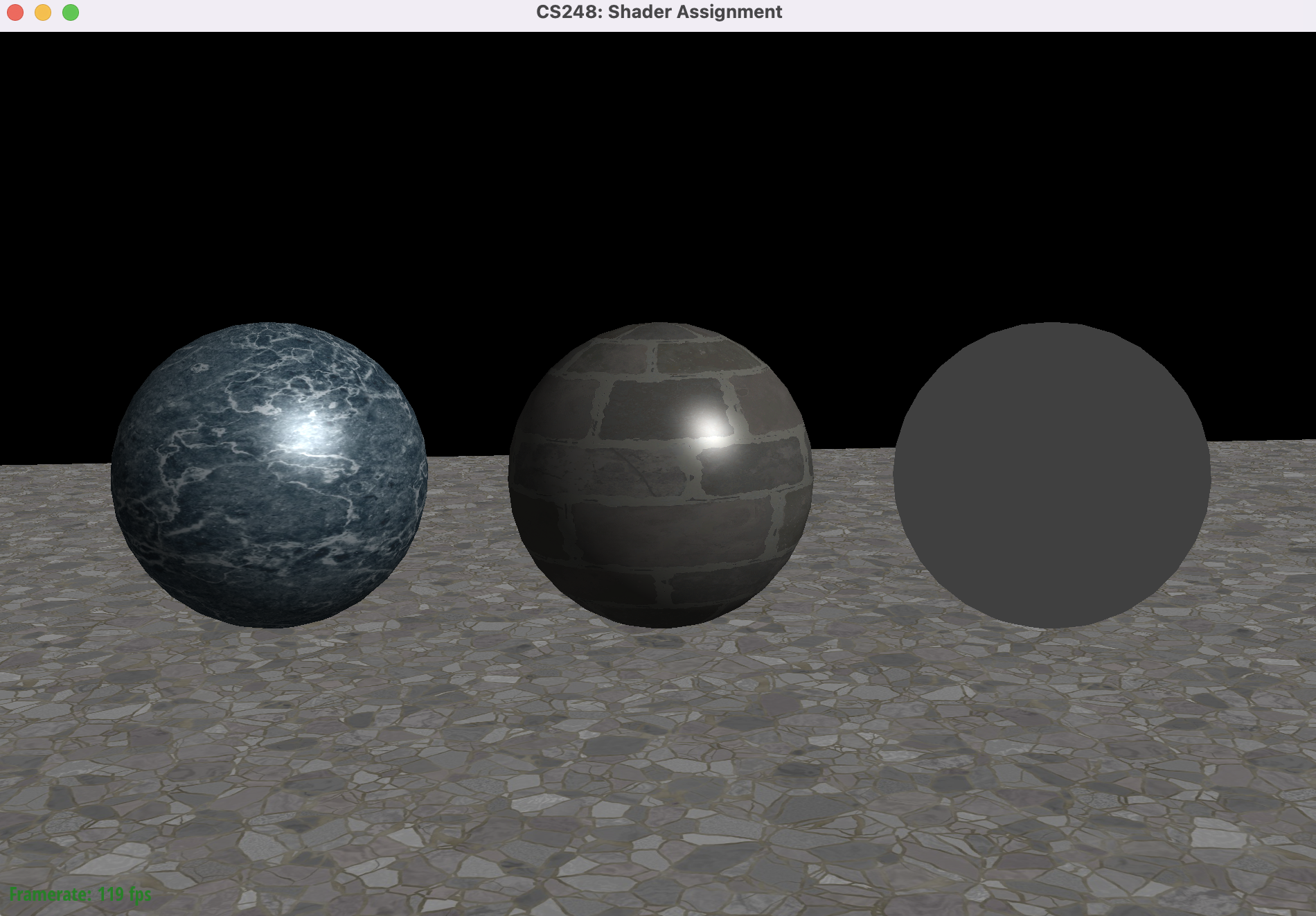
현재 Scene은 바닥 평면과 두 개의 Sphere가 텍스쳐가 입혀진 상태인데, 렌더링 과정에서 lighting 구현이 없습니다.
lighting 구현을 위해서는 src/shader/shader.frag 파일의 Phong_BRDF()을 구현하면 됩니다.
ambient term은 광원 source들과 무관하다는 것에 주의하시고, 표면 반사 결과와 합쳐져야 된다는 사실을 잊지마세요. (Starter 코드에는 이미 적용되어 있습니다.)
Phong 반사 모델이란
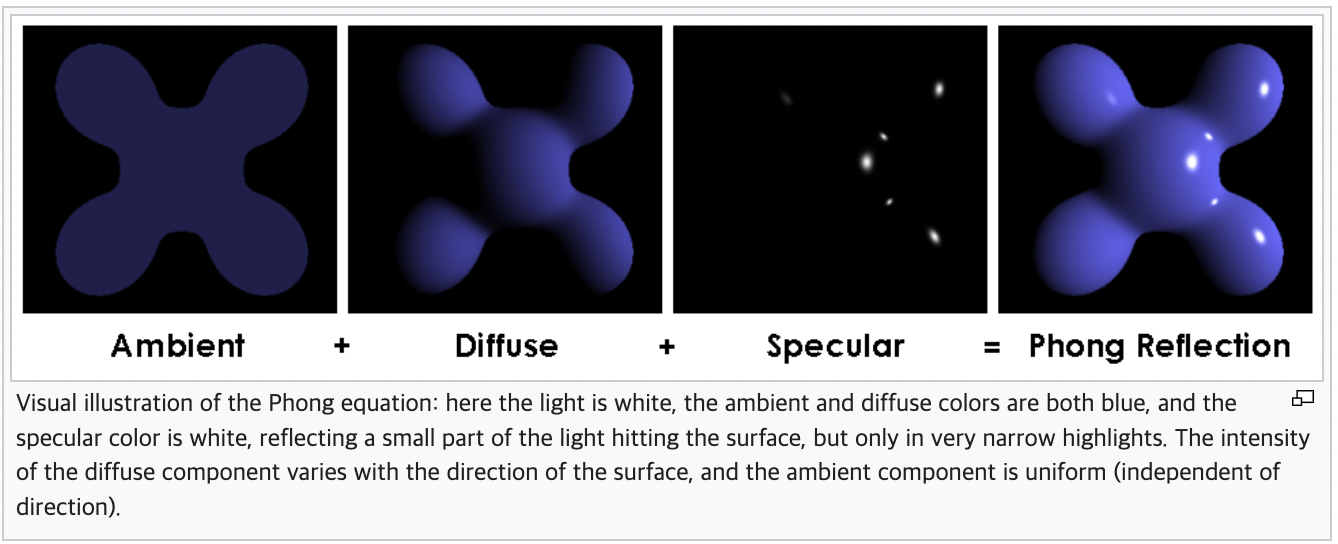
Phong 반사 모델이란, local illumination 모델 중의 하나로 물체의 표면 반사를 ambient + diffuse reflection + specular reflection 으로 표현하는 방법입니다. Ambient는 간접조명에의한 색이며 global illumimation을 근사하기위해 사용됩니다. Diffuse는 거친 표면의 물체가 반사하는 방식 (난반사), 그리고 Specular는 매끄러운 표면이 반사하는 방식(전반사)를 표현합니다.
기호 정의
Phong모델에서는 light source는 diffuse color와 specular color를 각각 가집니다. 각각 $i_d, i_s$ 기호를 사용합니다.
ambient color는 Scene의 모든 광원의 합으로 쓰기도 하지만, 이번 과제에서는 diffuse color를 그대로 사용합니다. 기호는 $i_a$ 입니다.
각 color의 비율을 조절하기 위해 각 color는 고유한 reflection constant를 가집니다.
각각 $k_a, k_d, k_s$ 기호를 사용합니다.
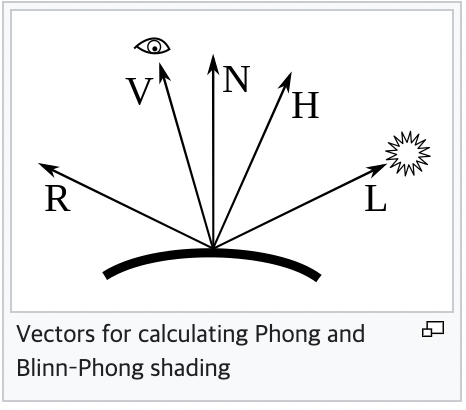
입력으로 들어오는 값을 기호로 정의해봅시다.
$\hat{L}$ 은 표면으로부터 광원의 방향벡터입니다.
$\hat{N}$ 은 표면에서의 법선 벡터 (노말 벡터) 입니다. 표면의 접면으로부터 수직 방향입니다.
$\hat{R}$ 은 $\hat{L}$ 이 법선벡터 기준으로 완벽하게 반사되었을 때의 벡터입니다.
$\hat{V}$ 는 표면으로부터 camera를 향하는 벡터입니다.
$\alpha$ 는 shininess 값이며, 물체의 표면이 얼마나 매끄러운지(클수록 완벽한 거울에 가까워집니다.) 표현하는 상수이며, 물체의 표면마다 고유한 값을 가집니다.
Ambient Color
Ambient color는 간단합니다. light의 방향에 상관없이 일정한 값을 가집니다.
$c_a = i_a * k_a $
Diffuse Color
Diffuse color는 물체의 법선벡터와 각이 좁아질수록 밝고, 각이 커질수록 어두워집니다. 빛이 물체를 비스듬하게 비출 때 더 어두워지는 것을 표현하기 위함입니다. 역시 $k_d$ 를 곱해서 비율을 조정합니다.
$c_d = k_d (\hat{L} \cdot \hat{N} ) i_d $
Specular Color
Specular color는 Camera의 방향이 $\hat{R}$, 즉 반사되는 빛 방향과 가까워질수록 밝아집니다. 역시 $k_s$ 를 곱해서 비율을 조정하며, $\alpha$ 에 비례합니다.
$c_s = k_s {(\hat{V} \cdot \hat{R})}^{\alpha} i_s $
최종 색깔
세 가지 color를 모두 합쳐주면 됩니다!
$c_{final} = c_a + c_d + c_s $
Source Code
vec3 Diffuse_BRDF(vec3 L, vec3 N, vec3 diffuse_color) {
    return diffuse_color * max(dot(N, L), 0.);
}

vec3 Specular_BRDF(vec3 L, vec3 V, vec3 N, vec3 specular_color, float specular_exponent) {
    vec3 R = normalize(2 * max(dot(L, N), 0.) * N - L);
    return specular_color * pow(max(dot(R, V), 0.), specular_exponent);
}


//
// Phong_BRDF --
//
// Evaluate phong reflectance model according to the given parameters
// L -- direction to light
// V -- direction to camera (view direction)
// N -- surface normal at point being shaded
//
vec3 Phong_BRDF(vec3 L, vec3 V, vec3 N, vec3 diffuse_color, vec3 specular_color, float specular_exponent)
{
    // TODO CS248 Part 2: Phong Reflectance
    // Implement diffuse and specular terms of the Phong
    // reflectance model here.
    float k_a = 0.2;
    float k_d = 0.5;
    float k_s = 0.5;

    vec3 c_a = k_a * diffuse_color;
    vec3 c_d = k_d * Diffuse_BRDF(L, N, diffuse_color);
    vec3 c_s = k_s * Specular_BRDF(L, V, N, specular_color, specular_exponent);

    return c_a + c_d + c_s;
}
$k_a, k_d, k_s 값은 눈으로 보기에 괜찮은 값을 임의로 설정했습니다.
소스코드
https://github.com/Jooh34/shading
GitHub - Jooh34/shading: Stanford CS248 Assignment 3: Real-time Shading
Stanford CS248 Assignment 3: Real-time Shading. Contribute to Jooh34/shading development by creating an account on GitHub.
github.com
출처
https://en.wikipedia.org/wiki/Phong_reflection_model
Phong reflection model - Wikipedia
The Phong reflection model (also called Phong illumination or Phong lighting) is an empirical model of the local illumination of points on a surface designed by the computer graphics researcher Bui Tuong Phong. In 3D computer graphics, it is sometimes refe
en.wikipedia.org
https://github.com/stanford-cs248/shading
GitHub - stanford-cs248/shading: Stanford CS248 Assignment 3: Real-time Shading
Stanford CS248 Assignment 3: Real-time Shading. Contribute to stanford-cs248/shading development by creating an account on GitHub.
github.com
'OpenGL > CS-248 셰이더 프로그래밍' 카테고리의 다른 글
| Part 5-2 : 쉐도우 매핑 (Shadow Mapping) - 1 (0) | 2023.01.17 |
|---|---|
| 셰이더 프로그래밍 - Part 5-1 : Spotlights 추가하기 (0) | 2023.01.16 |
| 셰이더 프로그래밍 - Part 4: 환경광 추가하기 (0) | 2023.01.15 |
| 셰이더 프로그래밍- Part 3: 노말 매핑 (Normal mapping) (0) | 2023.01.05 |
| 셰이더 프로그래밍 - Part 1: Coordinate 변환 (Coordinate transform) (2) | 2023.01.01 |