셰이더 프로그래밍 Part 5-2 : 쉐도우 매핑 (Shadow Mapping) - 2
Part 5-2 두번째 파트에서 구현할 것
마지막 스텝은 shadow map generation pass에서 생성된 array texture를 fragment shader의 input으로 넘겨주는 것입니다. 이는 최종 렌더 패스에서 씬을 렌더링하는데 사용될 것입니다.
(이 바인딩 과정은 Mesh::internalDraw에서 구현하며, 우리가 이전 Part의 노말맵, 환경맵을 셰이더로 넘겨주는 것과 같은 동작입니다.)
GLSL fragment shader에서 Array Texture를 샘플링하는 것은 문법이 조금 다릅니다. Scene::visualizeShadowMap 과 src/shader/shadow_viz.frag 를 보면, 어떻게 사용하는지 확인할 수 있습니다.
Mesh::internalDraw에서 우리는 object space에서 light space로 가는 매트릭스 배열을 넘겨주어야합니다.
mesh.cpp/Mesh::internalDraw 수정
먼저 mesh.cpp/Mesh::internalDraw 함수를 봅시다.
Part 5.2가 두 가지가 있는데요,
int numShadowedLights = scene_->getNumShadowedLights();

// TODO CS248 Part 5.2: Shadow Mapping
// You need to pass an array of matrices to the shader.
// They should go from object space to the "light space" for each spot light.
// In this way, the shader can compute the texture coordinate to sample from the
// Shadow Map given any point on the object.
// For examples of passing arrays to the shader, look below for "directional_light_vectors[]" etc.
먼저 우리가 계산했었던 objectToLightSpaceNDC 매트릭스를 Array형태로 (light개수만큼) 셰이더로 넘겨주어야합니다.
    // TODO CS248 Part 4: Environment Mapping:
    // You want to pass the environment texture into the shader program.
    // See diffuseTextureSampler for an example of passing textures.
    if (doEnvironmentMapping_)
        shader_->setTextureSampler("environmentTextureSampler", environmentTextureId_);

    // TODO CS248 Part 5.2: Shadow Mapping:
    // You want to pass the array of shadow textures computed during shadow pass into the shader program.
    // See Scene::visualizeShadowMap for an example of passing texture arrays.
    // See shadow_viz.frag for an example of using texture arrays in the shader.
그리고 조금 내려보면, 이전에 setTextureSampler 함수로 환경맵을 넘겨준 코드가 있었습니다.
Part 5.2에서는 같은 방식으로 light shadow map을 넘겨주어야합니다.
objectToLightSpace 매트릭스부터 넘겨봅시다.
objectToLightSpace 매트릭스는 part3 노말 매핑에서 사용했던 objectToWorld 매트릭스와
이전 글 part 5-2 (1) 에서 구했던 worldToLight 매트릭스를 곱해주는 방식으로 구할 수 있습니다.
WorldToLight
우리가 scene.cpp/Scene::renderShadowPass 에서 worldToLightNDC를 구하여, worldToShadowLight_ 배열에 저장해두었습니다. 이 매트릭스를 사용하면 됩니다.
std::unique_ptr<Cleanup> c1 = gl_mgr_->bindFrameBuffer(shadowFrameBufferId_[shadowedLightIndex]);

Matrix4x4 worldToLight = createWorldToCameraMatrix(lightPos, lightPos+lightDir, Vector3D(0,1,0));
Matrix4x4 proj = createPerspectiveMatrix(fovy, aspect, near, far);
Matrix4x4 worldToLightNDC = proj * worldToLight;

//worldToShadowLight_[shadowedLightIndex].zero();
worldToShadowLight_[shadowedLightIndex] = worldToLightNDC;
다시 mesh.cpp/Mesh::internalDraw 로 돌아와서 worldToLightNDC라는 이름으로 vertex shader에 매트릭스의 배열 형태로 넘겨주도록 합시다.
int numShadowedLights = scene_->getNumShadowedLights();

// TODO CS248 Part 5.2: Shadow Mapping
// You need to pass an array of matrices to the shader.
// They should go from object space to the "light space" for each spot light.
// In this way, the shader can compute the texture coordinate to sample from the
// Shadow Map given any point on the object.
// For examples of passing arrays to the shader, look below for "directional_light_vectors[]" etc.
for (int j = 0; j < numShadowedLights; j++)
{
    string varname = "worldToLightNDC[" + std::to_string(j) + "]";
    shader_->setMatrixParameter(varname, scene_->getWorldToShadowLight(j));
}

checkGLError("after bind uniforms, about to bind textures");
shader_shadow.vert
이제는 익숙한 shader uniform 문법입니다. 4x4 매트릭스의 배열로 worldToLightNDC를 cpp로 부터 전달받고,
uniform mat3 obj2worldNorm;             // object to world transform for normals
uniform vec3 camera_position;           // world space camera position
uniform mat4 mvp;                       // ModelViewProjection Matrix

uniform bool useNormalMapping;         // true if normal mapping should be used

// Part 5.2;
uniform mat4 worldToLightNDC[MAX_NUM_LIGHTS];
vertex shader안에서의 계산을 통해 vertex position을 light screen space로 transform하여
position_shadowlights 라는 이름으로 fragment shader로 넘겨줄 것입니다.
// per vertex outputs
out vec3 position;                  // world space position
out vec3 vertex_diffuse_color;
out vec2 texcoord;
out vec3 dir2camera;                // world space vector from surface point to camera
out vec3 normal;
out mat3 tan2world;                 // tangent space rotation matrix multiplied by obj2WorldNorm

// Part 5.2
out vec4 position_shadowlights[MAX_NUM_LIGHTS]; // screen position on lightspace
계산 방법은 Part 5.2 코멘트의 하단입니다. vtx_position은 object space에서 정의되었으므로, obj2world매트릭스와 worldToLightNDC를 순서대로 곱합으로써 (openGL은 column major이므로 곱은 반대로 진행됨에 유의하세요.) object space -> world space -> light screen space로 변환됩니다. 결과가 vec4인 이유는 homogeneous space이기 때문이며, xy / w 를 해준다면 바로 스크린 공간으로 변환 가능합니다. (worldToLightNDC 매트릭스가 프로젝션까지 포함이기 때문입니다.)
normal = obj2worldNorm * vtx_normal;

vertex_diffuse_color = vtx_diffuse_color;
texcoord = vtx_texcoord;
dir2camera = camera_position - position;
gl_Position = mvp * vec4(vtx_position, 1);

// Part 5.2 : transform the triangle vertex positions into light space
for (int j=0; j<num_spot_lights; j++)
{
    position_shadowlights[j] =  worldToLightNDC[j] * obj2world * vec4(vtx_position, 1);
}
src/shader/shader_shadow.frag
거의 다 왔습니다. fragment shader 수정만 남았는데, 조금 복잡합니다.
vec2 shadow_uv = position_shadowlight.xy / position_shadowlight.w;먼저 해당 변환을 통해 homogeneous-XYW => non-homogeneous XY 의 형태로 변환합니다.
Now you have a screen-space XY that you can use to sample the shadow map, and obtain the closest scene point at this location. You will need to test the value returned by the texture lookup against the distance between the current surface point and the light to determine if the surface is in shadow. (How do you compute this?)
스크린 XY값을 알게된다면, shadow map으로부터 값을 샘플링할 수 있고, 이 지점에서 가장 가까운 scene point를 얻을 수 있습니다.
여기서 체크해야할 것은, texture로부터 샘플했던 값이 현재 픽셀셰이더의 surface point -> light 까지의 거리와 비교하여 surface point가 그림자에 있는지 체크해보아야 합니다.
\
코드로 구현해봅시다.
먼저, 픽셀 셰이더에서 shadowlightMap을 사용해야하므로, 노말맵이나 텍스쳐맵을 넘기듯, mesh.cpp/Mesh::internalDraw 함수에서 넘겨줍시다.
mesh.cpp/Mesh::internalDraw 함수에서 TextureArraySampler 을 넘겨주는 로직을 작성해줍니다.
if (doNormalMapping_)
    shader_->setTextureSampler("normalTextureSampler", normalTextureId_);

// TODO CS248 Part 4: Environment Mapping:
// You want to pass the environment texture into the shader program.
// See diffuseTextureSampler for an example of passing textures.
if (doEnvironmentMapping_)
    shader_->setTextureSampler("environmentTextureSampler", environmentTextureId_);

// TODO CS248 Part 5.2: Shadow Mapping:
// You want to pass the array of shadow textures computed during shadow pass into the shader program.
// See Scene::visualizeShadowMap for an example of passing texture arrays.
// See shadow_viz.frag for an example of using texture arrays in the shader.
shader_->setTextureArraySampler("shadowlightMapSamplerArray", scene_->getShadowTextureArrayId());
계속해서 shader_shadow.frag 파일에 TextureSampler를 선언해준다면 픽셀 셰이더에서 shadowlightMapSamplerArray를 사용할 수 있습니다.
//
// texture maps
//

uniform sampler2D diffuseTextureSampler;

// TODO CS248 Part 3: Normal Mapping

uniform sampler2D normalTextureSampler;

// TODO CS248 Part 4: Environment Mapping

uniform sampler2D environmentTextureSampler;

// CS248 Part 5-2: shadowlightMapSamplerArray
uniform sampler2DArray shadowlightMapSamplerArray;
마지막으로 spot light intensity를 계산하는 부분 하단에, shadow 를 그려주는 로직을 작성합니다.
// for all spot lights
for (int i = 0; i < num_spot_lights; ++i) {

    vec3 intensity = spot_light_intensities[i];   // intensity of light: this is intensity in RGB
    vec3 light_pos = spot_light_positions[i];     // location of spotlight
    float cone_angle = spot_light_angles[i];      // spotlight falls off to zero in directions whose
                                                  // angle from the light direction is grester than
                                                  // cone angle. Caution: this value is in units of degrees!

    vec3 dir_to_surface = position - light_pos;
    float angle = acos(dot(normalize(dir_to_surface), spot_light_directions[i])) * 180.0 / PI;

    // TODO CS248 Part 5.1: Spotlight Attenuation: compute the attenuation of the spotlight due to two factors:
    // (1) distance from the spot light (D^2 falloff)
    // (2) attentuation due to being outside the spotlight's cone
    //
    // Here is a description of what to compute:
    //
    // 1. Modulate intensity by a factor of 1/D^2, where D is the distance from the
    //    spotlight to the current surface point.  For robustness, it's common to use 1/(1 + D^2)
    //    to never multiply by a value greather than 1.
    //
    // 2. Modulate the resulting intensity based on whether the surface point is in the cone of
    //    illumination.  To achieve a smooth falloff, consider the following rules
    //
    //    -- Intensity should be zero if angle between the spotlight direction and the vector from
    //       the light position to the surface point is greater than (1.0 + SMOOTHING) * cone_angle
    //
    //    -- Intensity should not be further attentuated if the angle is less than (1.0 - SMOOTHING) * cone_angle
    //
    //    -- For all other angles between these extremes, interpolate linearly from unattenuated
    //       to zero intensity.
    //
    //    -- The reference solution uses SMOOTHING = 0.1, so 20% of the spotlight region is the smoothly
    //       facing out area.  Smaller values of SMOOTHING will create hard spotlights.

    // CS248: remove this once you perform proper attenuation computations
    float D = length(dir_to_surface);
    float distance_attenuation = 1. / (1.+pow(D, 2.));
    intensity *= distance_attenuation;

    float SMOOTHING = 0.1;
    float range = 2 * SMOOTHING * cone_angle;
    float value = angle - ((1.0 - SMOOTHING) * cone_angle);
    float ratio = value/range;
    if (ratio < 0) ratio = 0;
    else if (ratio > 1) ratio = 1;

    intensity *= (1.0 - ratio);

    // Render Shadows for all spot lights
    // TODO CS248 Part 5.2: Shadow Mapping: comute shadowing for spotlight i here

    vec4 position_shadowlight = position_shadowlights[i];
    vec3 proj_coords = position_shadowlight.xyz / position_shadowlight.w;
    proj_coords = proj_coords * 0.5+0.5;
    vec2 shadow_uv = proj_coords.xy;

    float surface_depth = proj_coords.z;
    float depth = texture(shadowlightMapSamplerArray, vec3(shadow_uv, i)).x;  // Using the i-th layer

    float eps = 0.0001;
    float shadow = (surface_depth - depth > eps) ? 1.f : 0.f;

    vec3 L = normalize(-spot_light_directions[i]);
    vec3 brdf_color = Phong_BRDF(L, V, N, diffuseColor, specularColor, specularExponent);

    Lo += (1.f-shadow) * intensity * brdf_color;
}
// Render Shadows for all spot lights 코멘트의 하단이 그림자를 그리는 부분입니다.
이렇게 그림자를 그리고 나면, 마지막으로 해결해야할 문제가 눈에 보이는데 바로 shadow acne 현상입니다.
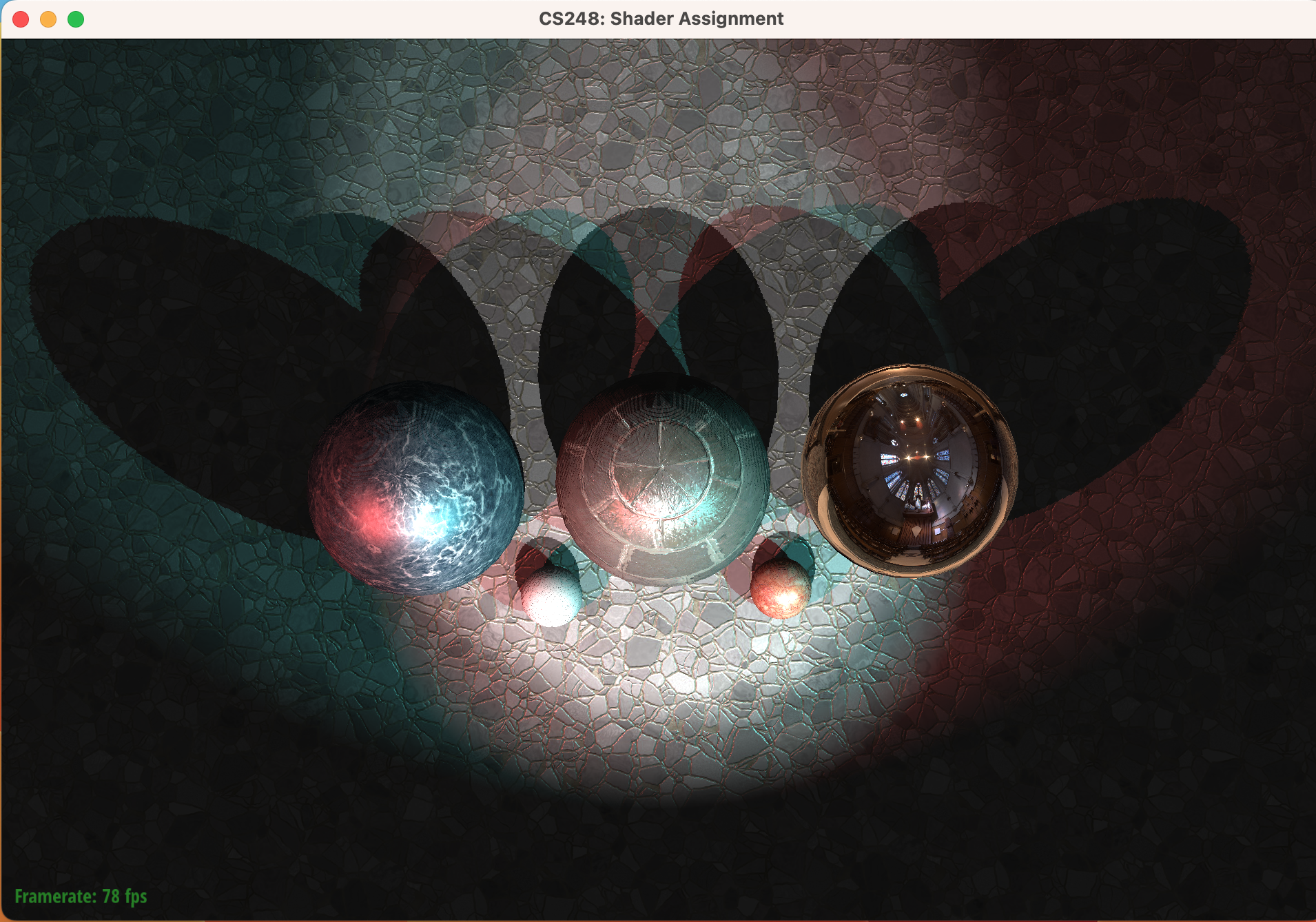
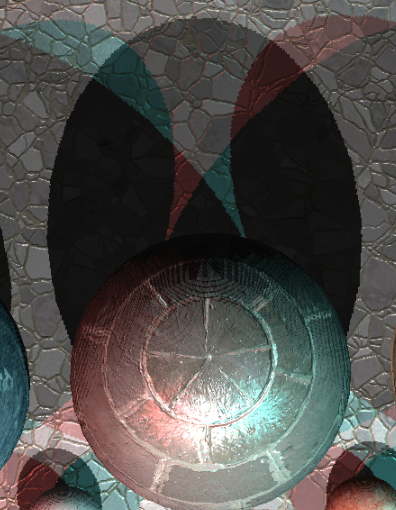
그림자 부분을 자세히 확대해보면 지글지글한 부분이 있습니다.
shadow depth map 역시 픽셀을 가지는 discrete한 texture 공간이기 때문에 aliasing 문제가 발생하기 때문입니다.
이를 보완해줄 방법이 여러가지 있는데, percentage closure filtering (PCF) 방식을 통해 aliasing을 줄여봅시다.
PCF
pcf는 텍스쳐 필터링과 비슷한 방법인데요, 기존에는 그림자 영역인지 판별할 때 shadow map의 픽셀 하나에 대해서 그림자다(1) 아니다(0) 두개의 binary 값으로 결정을 했다면 pcf는 여러 픽셀을 필터링하는 방식입니다.
5x5 PCF에서는 내가 샘플할 Shadow map pixel 근처의 5x5 영역에 대해서 그림자 판별을 진행하고, 이 25개의 값을 평균내어 몇 퍼센트의 픽셀이 ( ? / 25 ) 그림자 영역인지를 float값으로 사용합니다.
PCF 구현
하단 코드는 percentage closure filtering (PCF) 라는 기법을 사용하여 shadow map에서 근처의 여러 값을 샘플링해와 보간해주는 방법입니다.
// Render Shadows for all spot lights
// TODO CS248 Part 5.2: Shadow Mapping: comute shadowing for spotlight i here

vec4 position_shadowlight = position_shadowlights[i];
vec3 proj_coords = position_shadowlight.xyz / position_shadowlight.w;
proj_coords = proj_coords * 0.5+0.5;
vec2 shadow_uv = proj_coords.xy;
float surface_depth = proj_coords.z;
float eps = 0.0001;

float pcf_step_size = 256;
float shadow = 0.f;
for (int j=-2; j<=2; j++) {
    for (int k=-2; k<=2; k++) {
        vec2 offset = vec2(j,k) / pcf_step_size;
        // sample shadow map at shadow_uv + offset
        // and test if the surface is in shadow according to this sample
        float depth = texture(shadowlightMapSamplerArray, vec3(shadow_uv+offset, i)).x;  // Using the i-th layer

        shadow += (surface_depth - depth > eps) ? (1.f / 25) : 0.f;
    }
}

vec3 L = normalize(-spot_light_directions[i]);
vec3 brdf_color = Phong_BRDF(L, V, N, diffuseColor, specularColor, specularExponent);

Lo += (1.f-shadow) * intensity * brdf_color;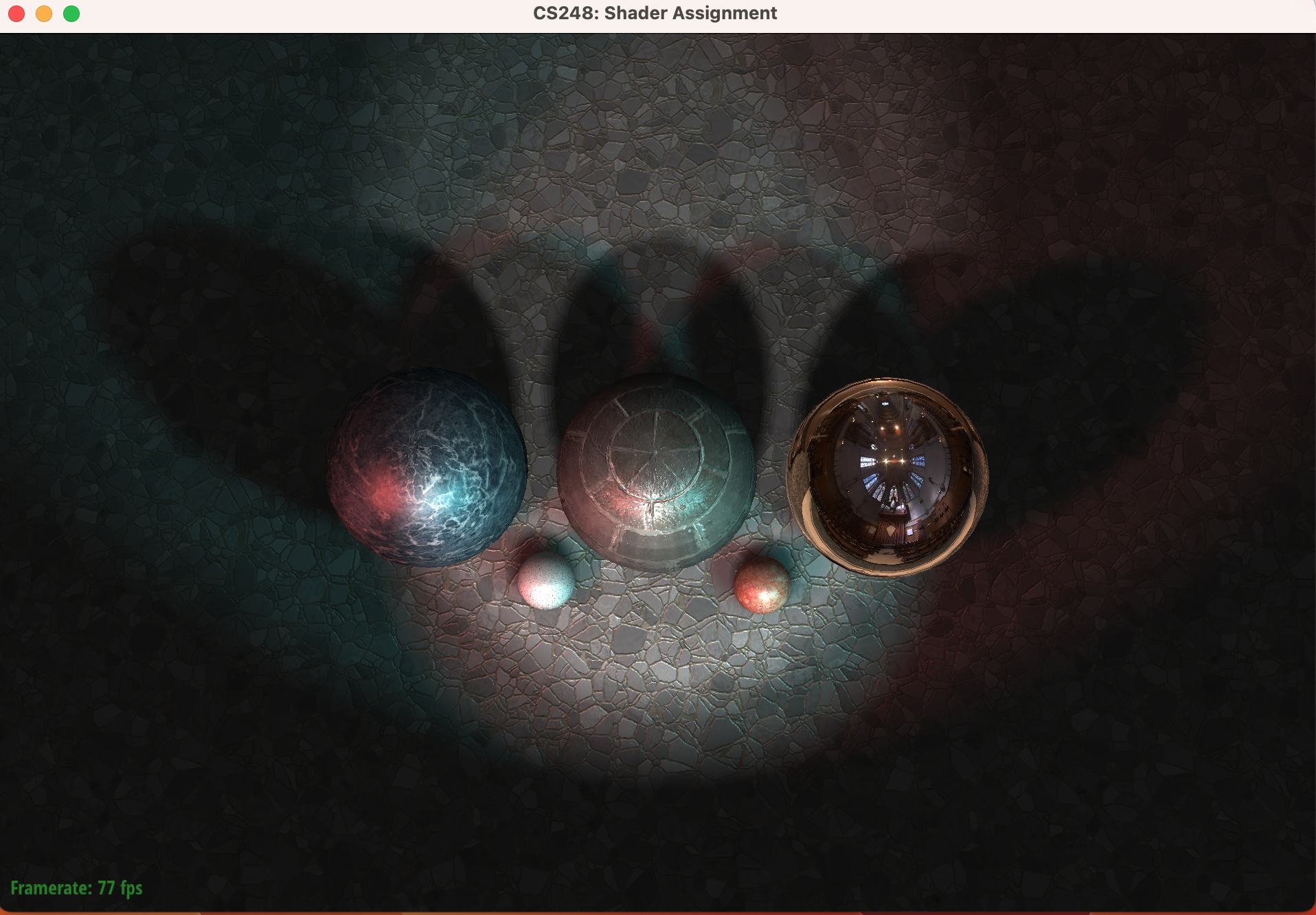
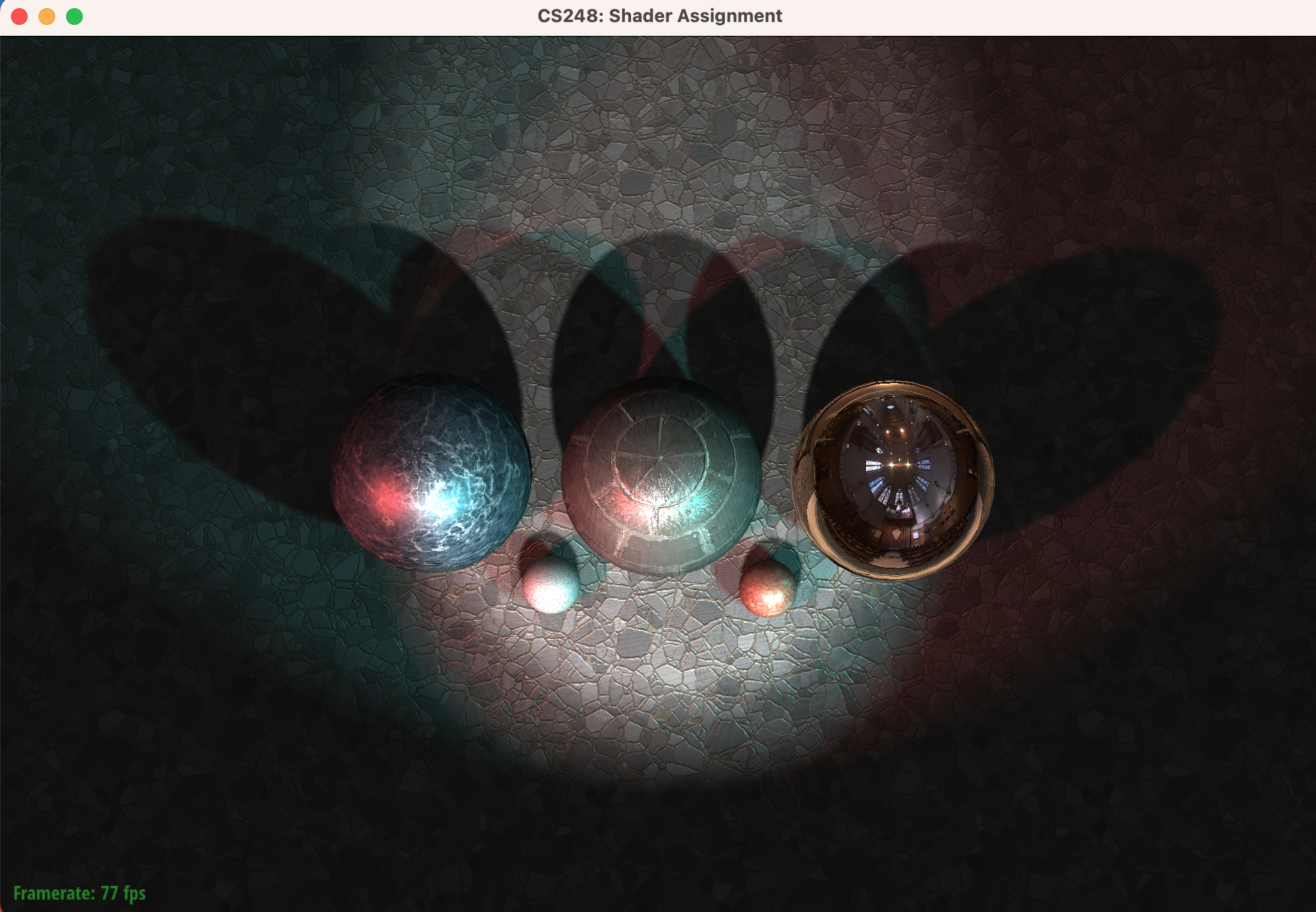
해당 구현으로 shadow acne현상은 사라졌으며, pcf_step_size 조절로 그림자의 부드러움 정도를 조절할 수 있습니다.
pcf_step_size를 작게하면 좀 더 soft 한 그림자가, 크게할수록 hard한 그림자가 그려집니다. 샘플링하는 범위의 차이로 일어나는 현상입니다.
최종 결과
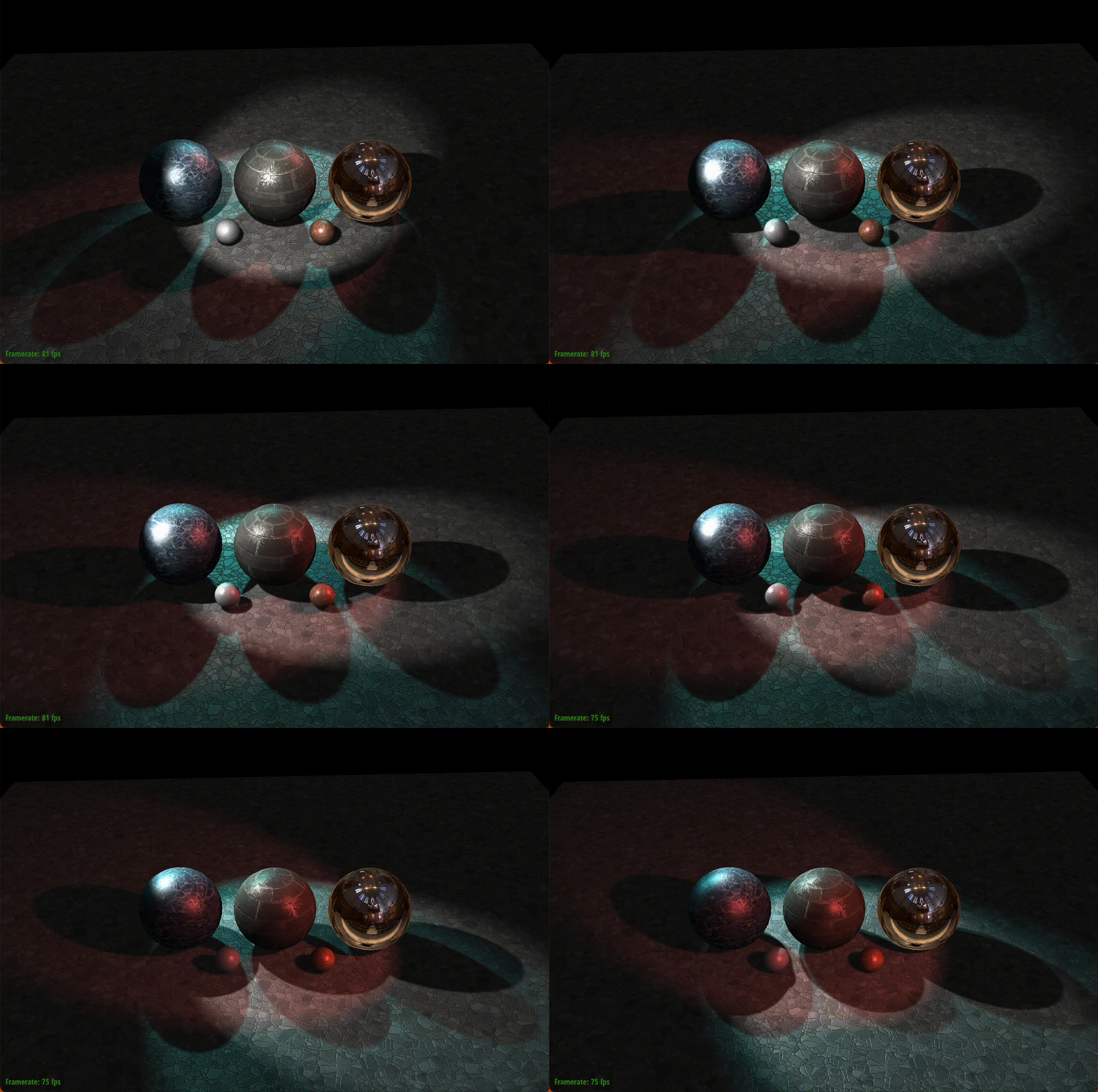
그림자까지 구현되면서, 이번 shading project의 기본구현은 모두 끝났습니다!
여기까지 구현하였다면 리얼타임 렌더러의 몇 가지 키 포인트들의 이론은 익힌 것입니다. 수고하셨습니다.
'D' 키를 눌러서 디스코모드로 멋진 리얼타임 렌더링을 즐겨보세요.
출처
'OpenGL > CS-248 셰이더 프로그래밍' 카테고리의 다른 글
| Part 5-2 : 쉐도우 매핑 (Shadow Mapping) - 1 (0) | 2023.01.17 |
|---|---|
| 셰이더 프로그래밍 - Part 5-1 : Spotlights 추가하기 (0) | 2023.01.16 |
| 셰이더 프로그래밍 - Part 4: 환경광 추가하기 (0) | 2023.01.15 |
| 셰이더 프로그래밍- Part 3: 노말 매핑 (Normal mapping) (0) | 2023.01.05 |
| 셰이더 프로그래밍 - Part 2: 퐁 반사모델 구현하기 (0) | 2023.01.03 |